
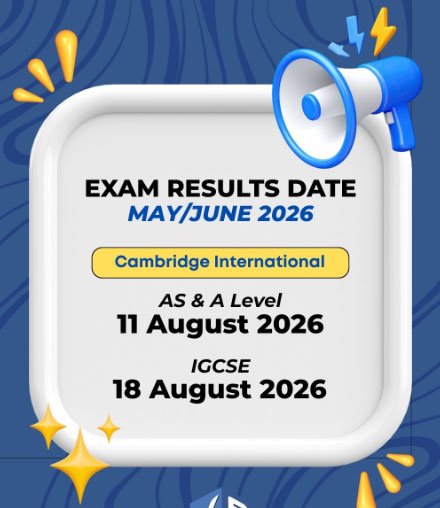
Pakistan Cambridge O Level and IGCSE Result 2026 Check online by roll no today 18th August 2026. On Tuesday, IGCSE Cambridge O Level exam result 2026 is being released officially at 5:00 GMT/UTC. Students of O Level exam can easily check their result at 10:00 on 18th August 2026. O Level exam held in Pakistan in June 2026. Since that, students were waiting for the result announcement.
Pakistan Cambridge O Level and IGCSE Result 2026
Students should contact their school or examination centre to find out how they can access their Cambridge results. Cambridge sends exam results directly to schools through the Cambridge International Direct platform. This service is mainly designed for schools and exam officers, so individual students cannot normally use it themselves.
Some schools also provide access to the Candidate Results service, which allows students to check their results online. If this option is available, the school will give students the required username and password. If you have not received your login details, contact your school’s exams officer or your examination centre for assistance.
Cambridge O Level Results 2026 Release on 18th August
The Cambridge O Level results for the June 2026 exam series were officially released on August 18, 2026, at 05:00 GMT/UTC. Students can access their grades directly through their registered schools, exam centers, or the online Candidate Results portal.
Punjab Rangers Jobs 2026 Online Apply Last Date
Cambridge May & June Exam Result 2026 Announced
Cambridge International A Level exam results were announced on 11 August 2026. O Level students in Pakistan can now check their June O Level Exam Results 2026. We have shared a direct link to check your exam results and scores.
How to Check Cambridge O Level Exam Result 2026?
- Contact your school or examination centre for your result details.
- Ask the school whether you have access to the Candidate Results Service.
- If available, use the username and password provided by your school to check your result online.
- Enter your login details and view your O Level grades and results.
- If you have not received your login information, contact your school’s exams officer for assistance.